
Compiling the next screen…
Compiling the next screen…
Retrieval, AI drafting, and human approval in one reviewable pipeline.
A working demo of a retrieval-augmented generation (RAG) pipeline built as a full application, not a chatbot. A recipient submits their background, the app retrieves matching reference material, an AI model drafts a biography from that context, and an operator must approve it before it reaches anyone.
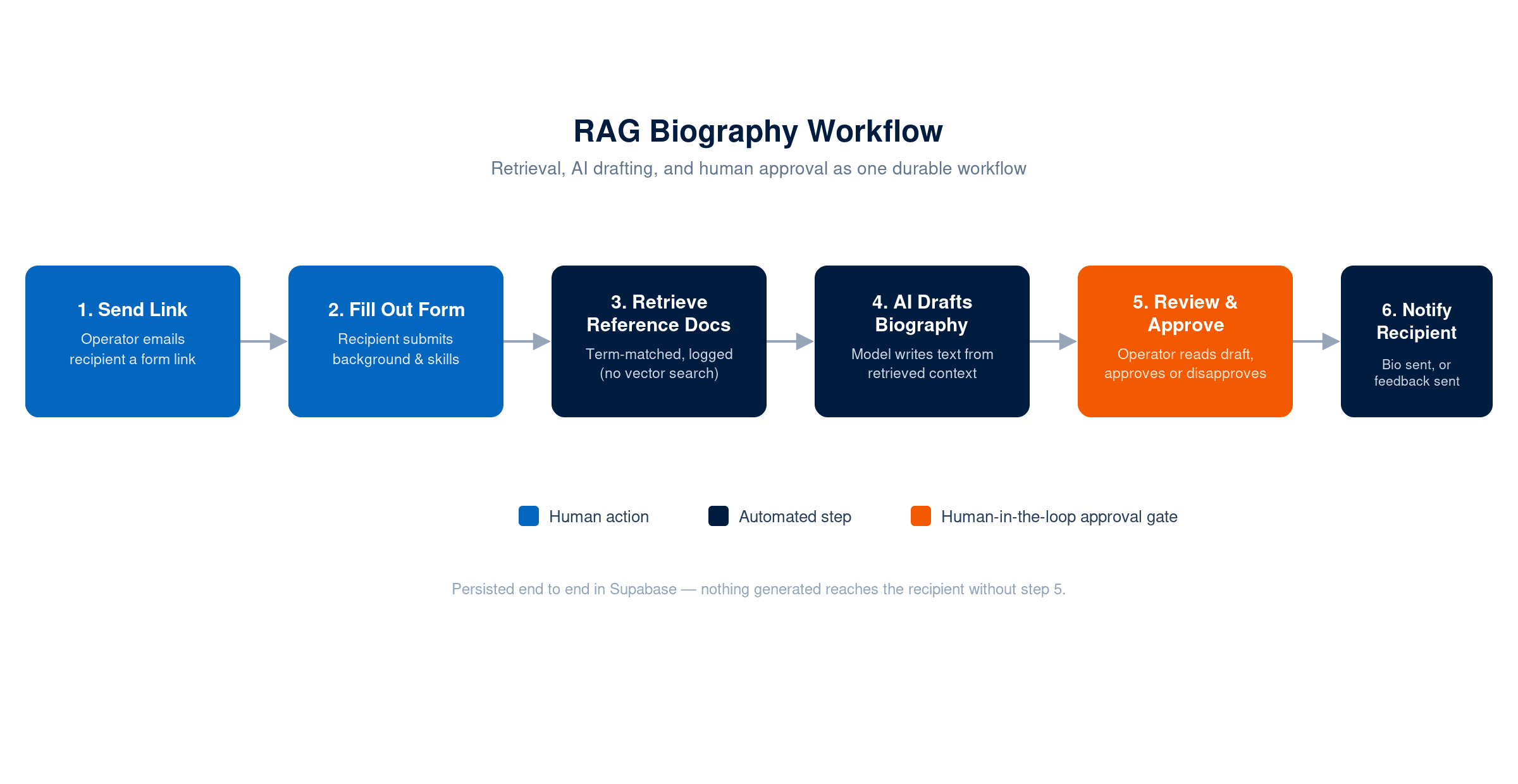
Teams that want to show what a RAG system does often end up with one of two things. A slide that says "RAG" with no working software behind it. Or a chatbot demo that hides the retrieval step inside a black box. Neither shows how retrieval, generation, and human review fit together as one real workflow.
The goal was a small, complete demo a technical buyer or stakeholder could watch end to end. A person requests a biography. The system pulls the right reference material for that person. An AI model drafts the text from it. A human signs off before anything goes out. Not a chatbot toy — a durable workflow with real state, real persistence, and a real approval gate.
David designed and built the application as a Cataluma engineering project: the workflow, the retrieval logic, the AI integration, the UI, and the database schema.
Application layer. A Next.js app with three surfaces: an operator dashboard, a recipient-facing form, and a review screen. Each workflow moves through nine tracked states, from "link sent" to "approved" or "disapproved." Supabase (PostgreSQL) keeps that state through page reloads and server restarts.
Retrieval. Most demos skip this step. When a recipient submits the form, the app queries a bio_reference_documents table and scores each document against the submitted occupation and skills with term-overlap matching — no vector search, no embeddings. The top matches are selected and logged, so anyone can see exactly what was retrieved before generation ever runs. This scoring logic is Cataluma's own code, not the model's.
Generation. The retrieved reference material and the recipient's submitted details feed a prompt template. The AI SDK (generateText, OpenAI model, 500 max tokens) writes the biography text. This is the model's one job in the pipeline — everything upstream is deterministic code Cataluma controls.
Human review. The generated biography lands on the operator's dashboard as "Pending Approval." The operator reads the full text and either approves it, which sends it to the recipient, or disapproves it with a reason, which routes feedback back to the recipient instead. Nothing generated reaches the recipient without a person reading it first.
Data and integrations. Four Supabase tables — workflows, workflow_recipients, workflow_biographies, and bio_reference_documents — carry the full audit trail from request to decision. Email sending is simulated for the demo and logged to console, with the send path structured to drop in a provider like Resend without touching the workflow logic.
Solo build, start to finish: workflow design, database schema, retrieval and ranking logic, prompt construction, the Next.js UI, and the review and approval flow. No other engineers worked on this. It's a self-contained demo built to show applied-AI workflow design as a working system, not a slide.
The demo makes an otherwise invisible pipeline visible. Every retrieval decision, every generated draft, and every human approval is logged and reviewable. That's the same shape of workflow Cataluma builds for clients who need AI output that a person signs off on before it ships. It's a compact way to explain retrieval-with-approval to a non-technical stakeholder in under two minutes of screen time.
9 tracked states, 4 database tables, 1 approval gate — the whole audit trail, in one workflow.
Work directly with Cataluma’s principal consultant on the next useful technical step.